English
  Svenska
  Deutsch
  Suomi
Suomi  中文(简体)
Highlights IDA ICE 5.2
Free Release Webinar — October 15, 9:00 AM
 BIM & Geometry Workflows
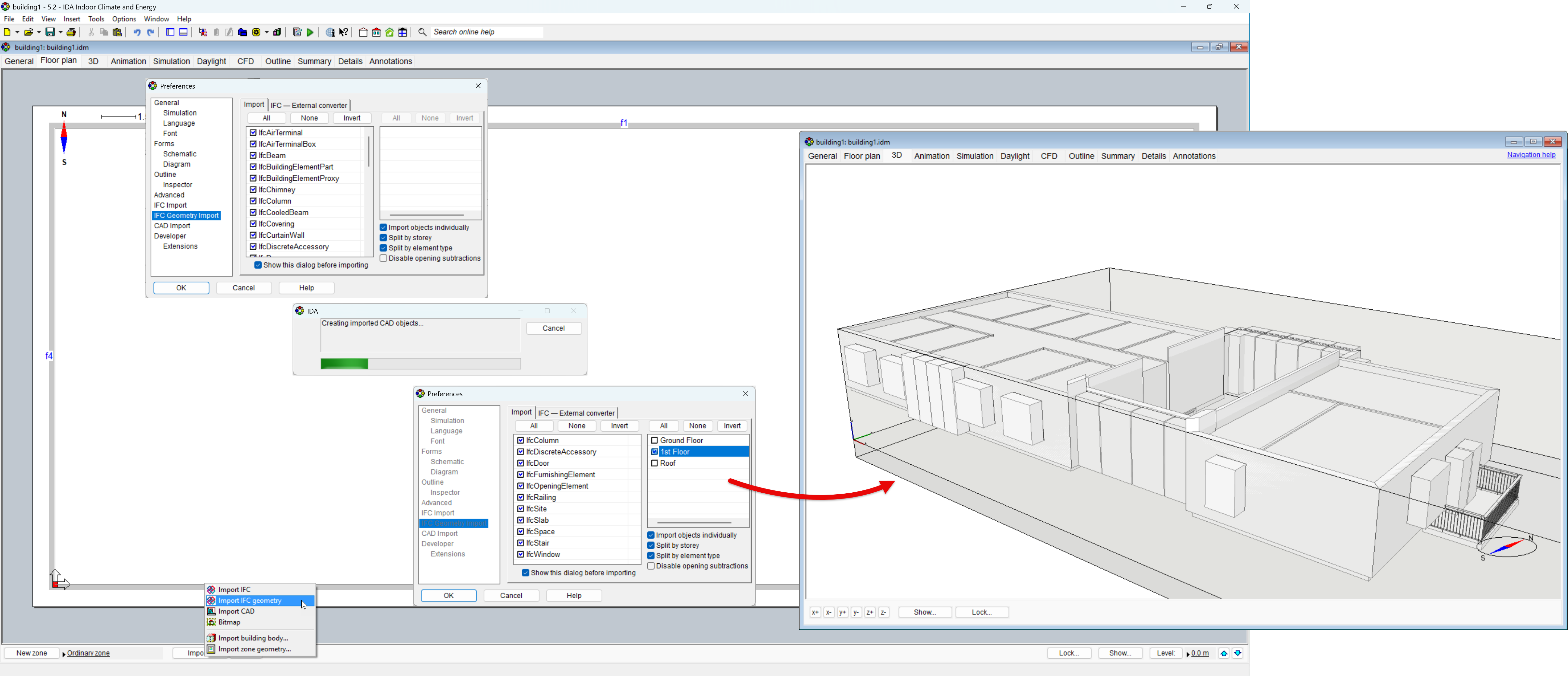
Extended IFC Import
Purpose: Extend the IFC import workflow with support for IFC4 and IFC4x3, partial model import and more flexible handling of imported building objects.
Ease of use: Provides greater control when preparing simulation models from large or imperfect BIM files. Models can be imported partially, stepwise, while imported objects can be adjusted or converted into appropriate building elements directly during model preparation.
Example: Import a large IFC model one story at a time; convert proxy objects into walls when the original BIM model contains simplified or non-standard geometry.
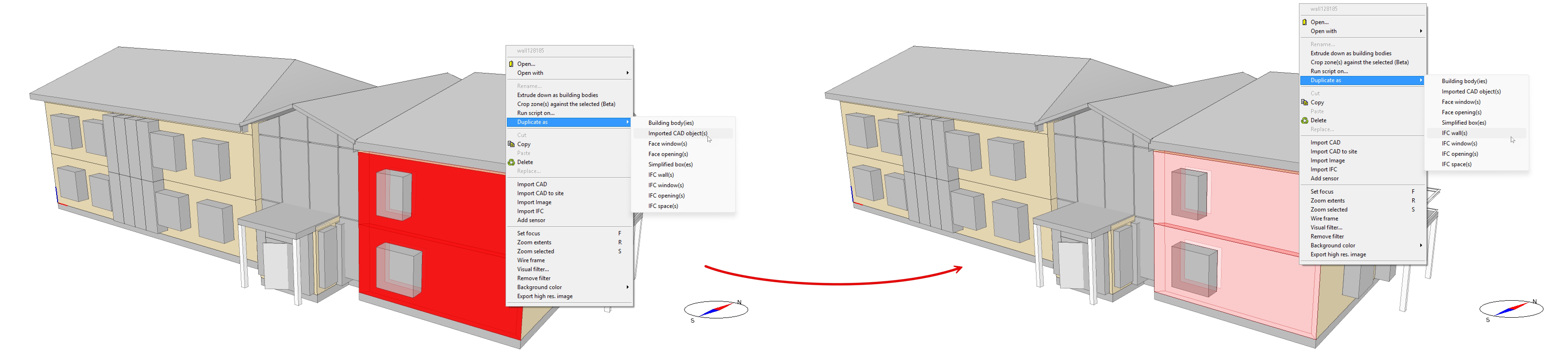
CAD-IFC Duplication
Function: Convert and duplicate geometry between CAD and IFC representations, including zones, directly from the 3D or Tables view.
Ease of use: Allows users to choose the most convenient representation for editing without rebuilding geometry from scratch.
Example: A faulty or incorrectly imported IFC wall now can be duplicated as CAD geometry, adjusted to match the intended building shape, and then recreated as an IFC building element.
Crop Zones and Building Bodies (beta)
Purpose: Create complex internal or external geometry by cropping zones/building bodies with other zones, extruded geometry, or building bodies.
Ease of use: Adds detailed geometry without requiring the surrounding zone structure to be rebuilt. The created zone surfaces are fully included in thermal and radiation calculations: view factor calculations for long-wave radiation exchange. They also can absorb and release heat like other building surfaces.
Examples: Create stepped seating in an auditorium; an intermediate floor inside a tall atrium or add free-standing radiators and other systems while keeping the original zone geometry intact.
Zone cropping:
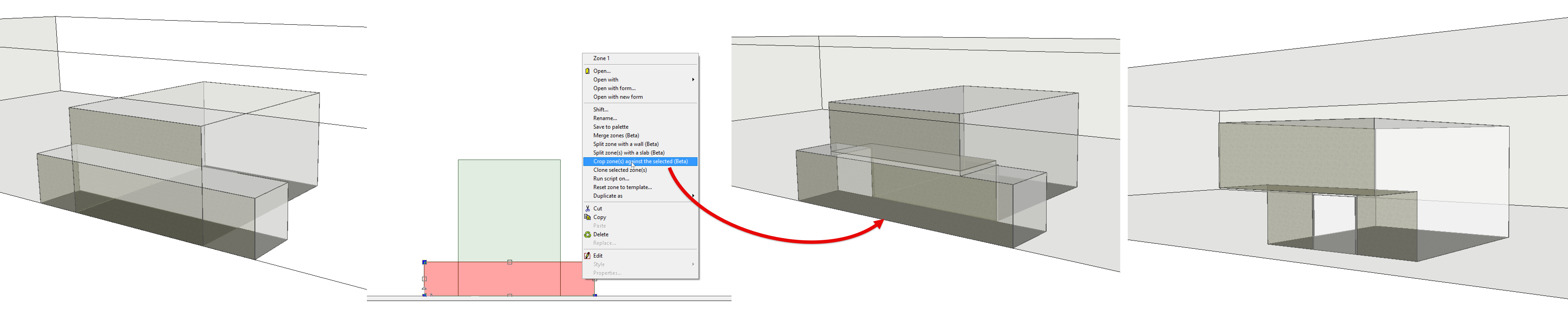
Building body cropping:

Individual CAD Object Selection in 3D
Purpose: Select individual CAD objects directly in the 3D view.
Ease of use: Removes the need to convert CAD geometry to IFC and back before editing, making geometry adjustments faster and more direct.
Example: Select and modify a single CAD wall or slab directly in a complex imported model without affecting the surrounding geometry.
Keeping objects when deleting
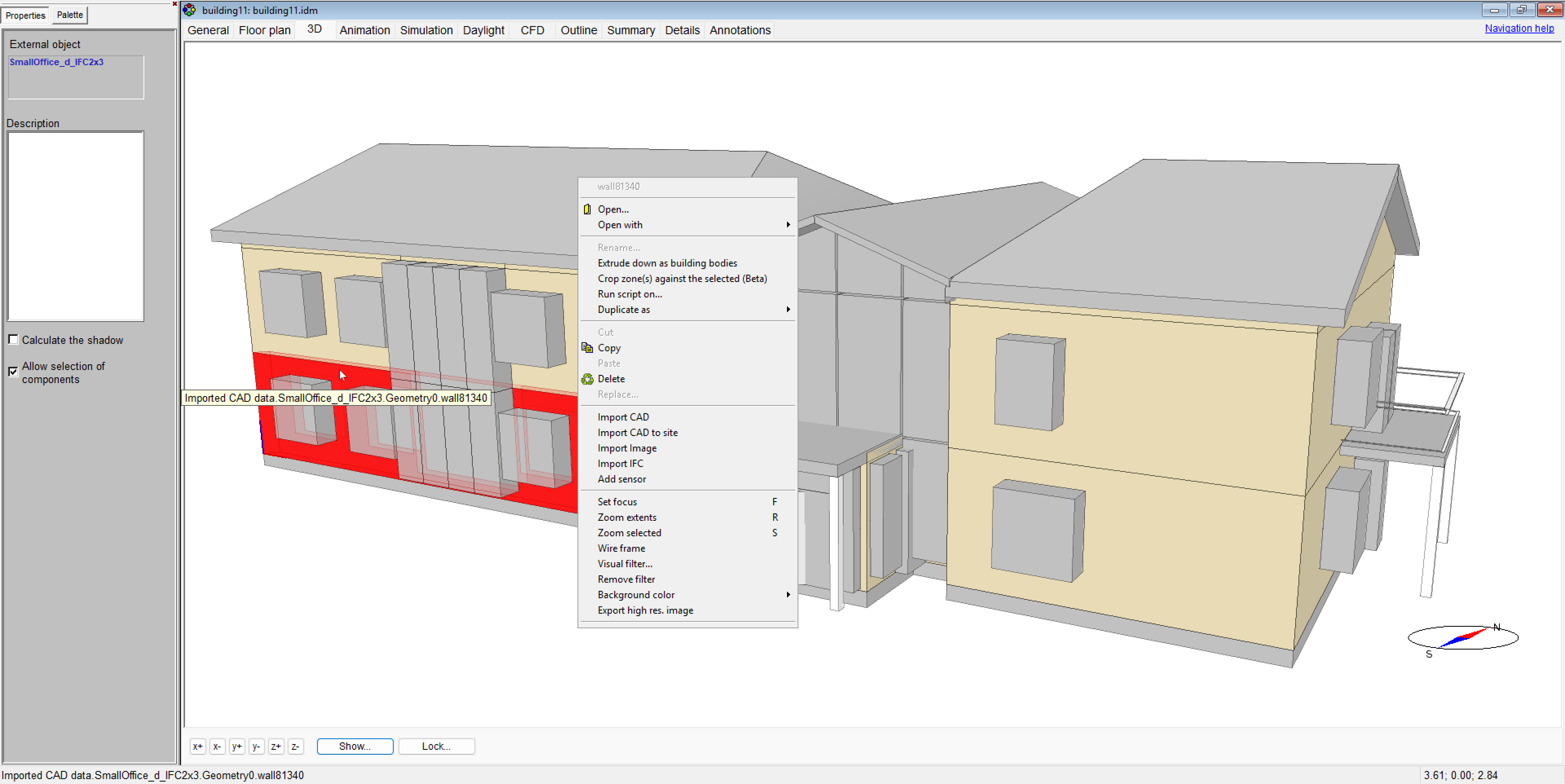
IDA ICE 5.2 improves object handling when replacing or modifying elements in the model by allowing objects to remain in place when related elements are deleted or replaced.
This is useful when creating new objects based on the position of existing objects. For example:
- replacing balcony doors while creating balcony geometries at the same positions
- creating façade elements below each window by duplicating and repositioning curtain wall elements
- placing sensors at positions defined by existing objects
Previously, such operations often required manual reconstruction of positions after deleting or replacing objects. The improved behavior allows users to retain objects that depend on existing positions, simplifying workflows where new elements are created based on the location of other model objects.
Shifting Multiple Objects Without Selection
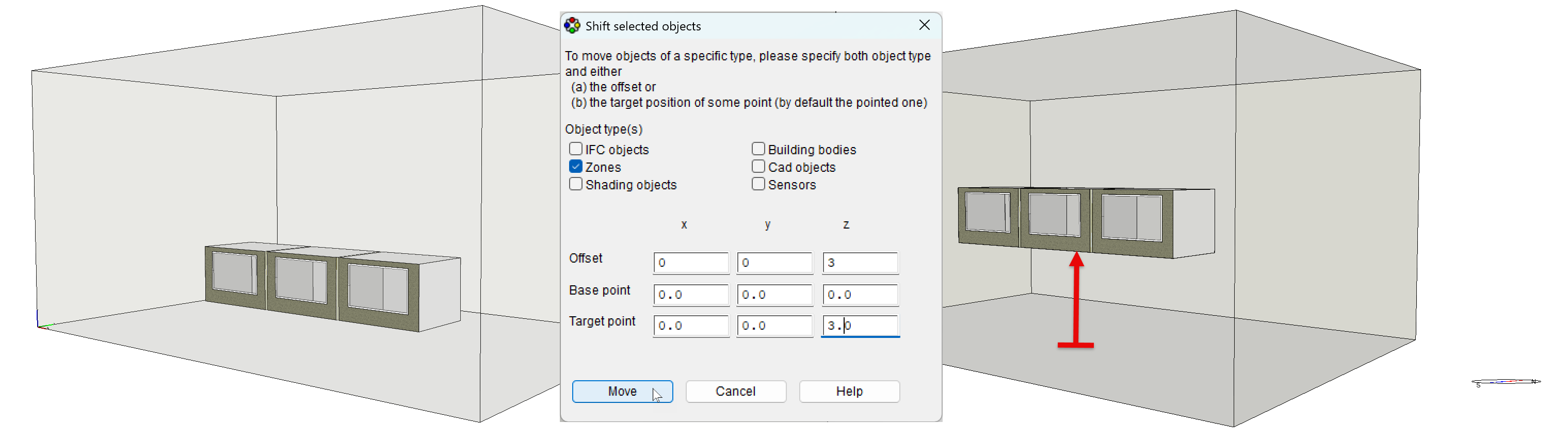
Purpose: Shift all objects of a specified type at once, without selecting them individually.
Ease of use: Makes repositioning groups of similar objects faster while retaining the existing option to shift selected objects individually. Access: Edit à Shift.
Example: Shift all zones, CAD objects, sensors, or other supported object types in all three dimensions in a single operation.
Story Navigation
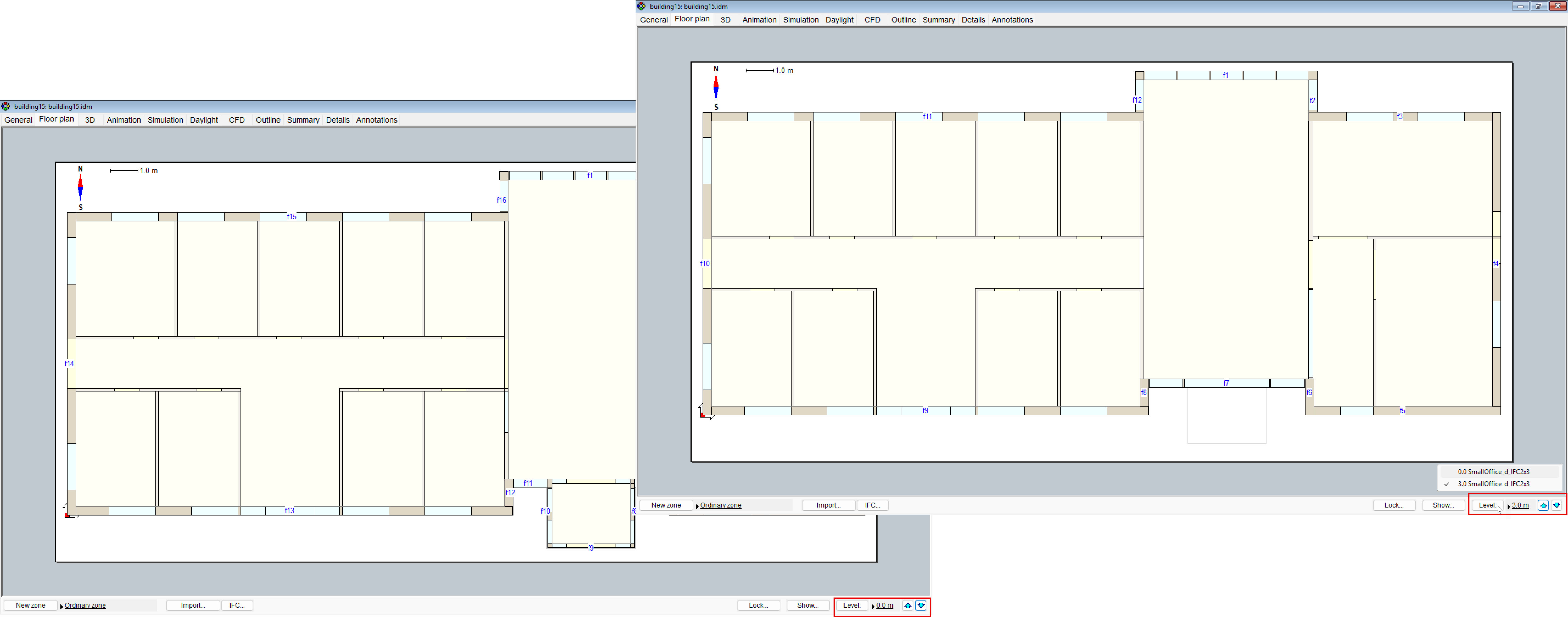
Purpose: Switch between building stories with a single click on the arrow buttons and identify the current story by its IFC name.
Ease of use: Makes floor-by-floor navigation faster and keeps imported BIM models easier to follow.
Example: Move directly between stories of a multi-story IFC model while retaining the original floor names.
Simulation & Analysis
Sunlight Exposure EN 17037
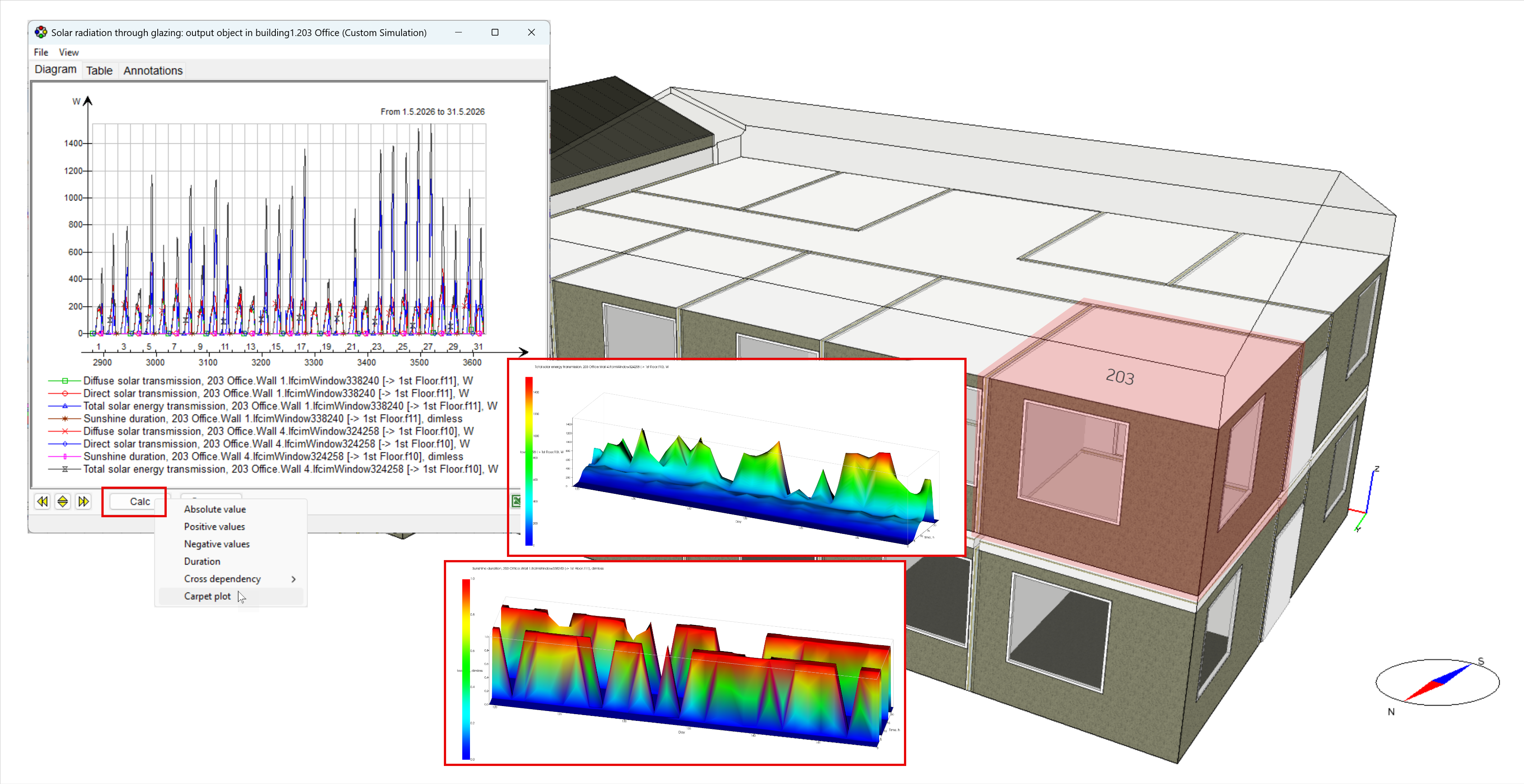
Purpose: Evaluate the duration of direct sunlight exposure on individual windows and verify sunlight requirements according to EN 17037.
Ease of use: Direct sunlight presence is available as a simulation output from “Solar radiation through windows” and can be converted into a duration plot, making it easy to assess and compare sunlight exposure across windows.
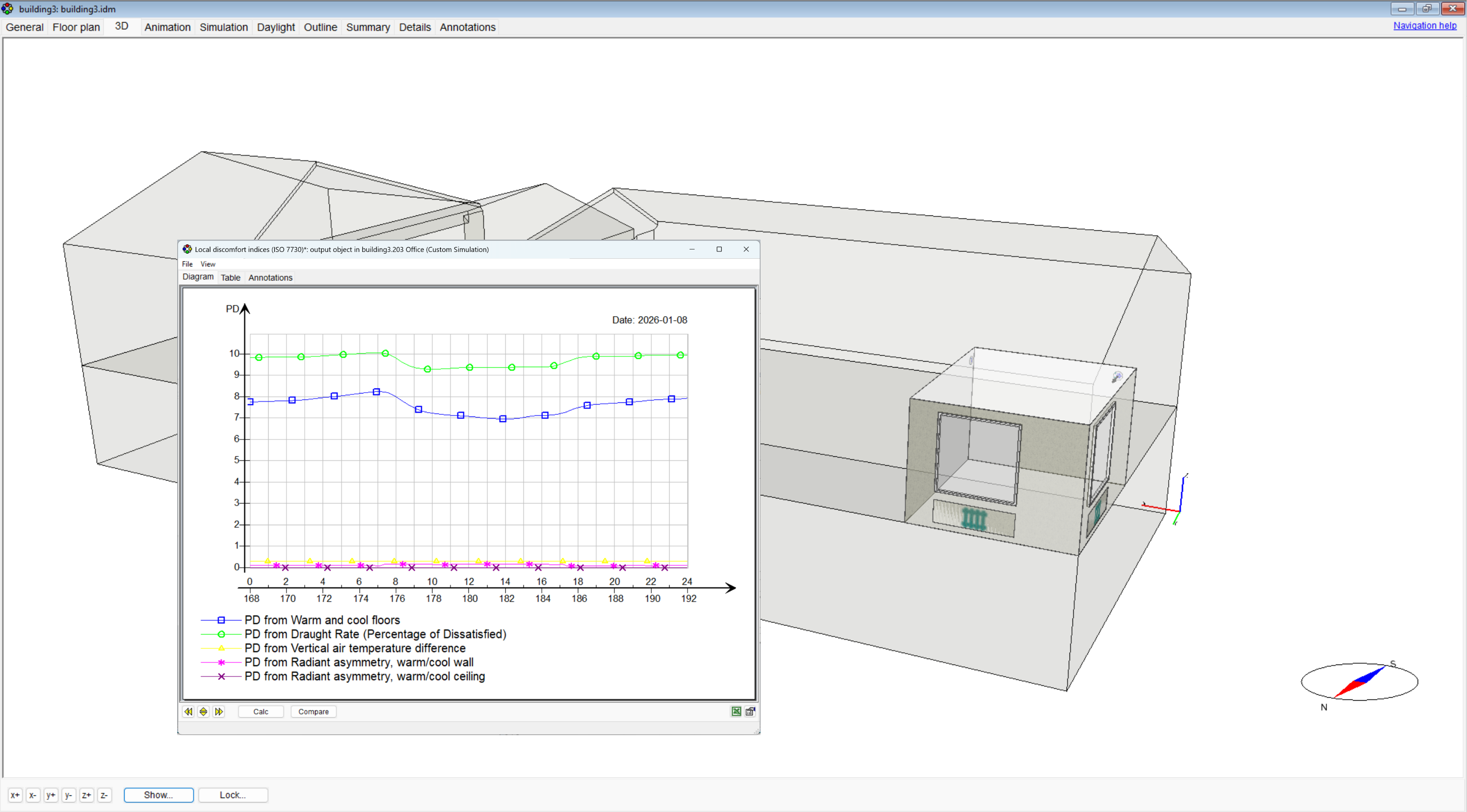
Local Thermal Discomfort ISO 7730
Purpose: Evaluate local thermal discomfort with the stratified zone model using ISO 7730 criteria, including draught, floor temperature, vertical air temperature difference and radiant temperature asymmetry.
Ease of use: Provides percentage dissatisfied (PD) outputs directly from spatially resolved air and radiant conditions, enabling detailed local comfort assessment without additional calculations. In addition, the model computes long-wave radiative exchange using detailed view factor calculations between room surfaces and occupants, allowing radiant temperature asymmetry to be evaluated correctly even for complex room geometries.
Example: Assess local discomfort in an office during a winter design day, including draught from supply air and discomfort caused by cold windows or surfaces.
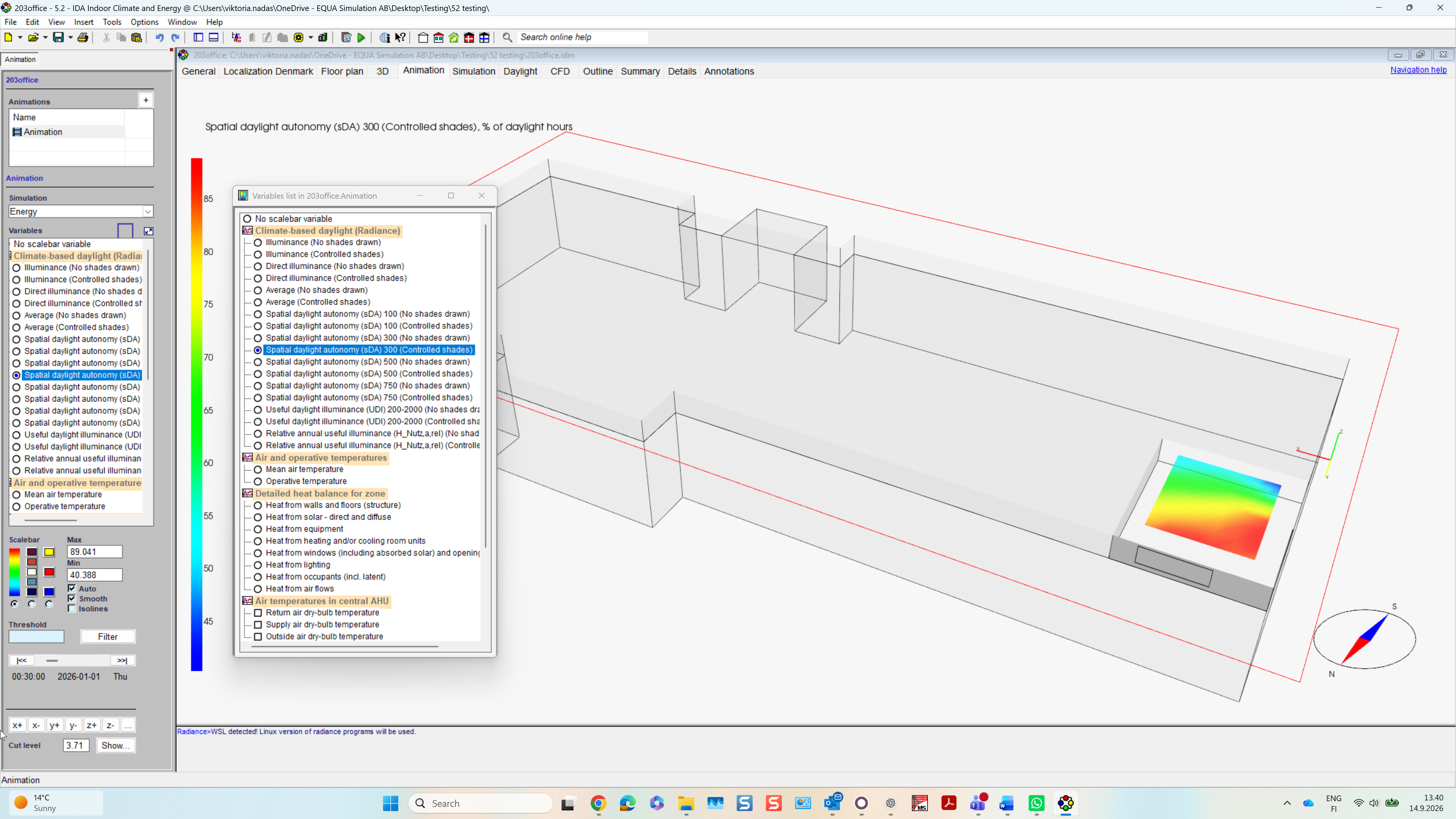
Controllable Shading in Daylight Simulation
Purpose: Include controllable shading in climate-based daylight simulations using the shading operation determined by the preceding thermal simulation, reflecting the actual shading operation.
Ease of use: Daylight metrics automatically account for actual shading operation, providing more realistic results and supporting daylight assessments required by building certification schemes.
Example: Evaluate annual daylight performance in an office where solar shading responds dynamically to changing indoor and outdoor conditions.
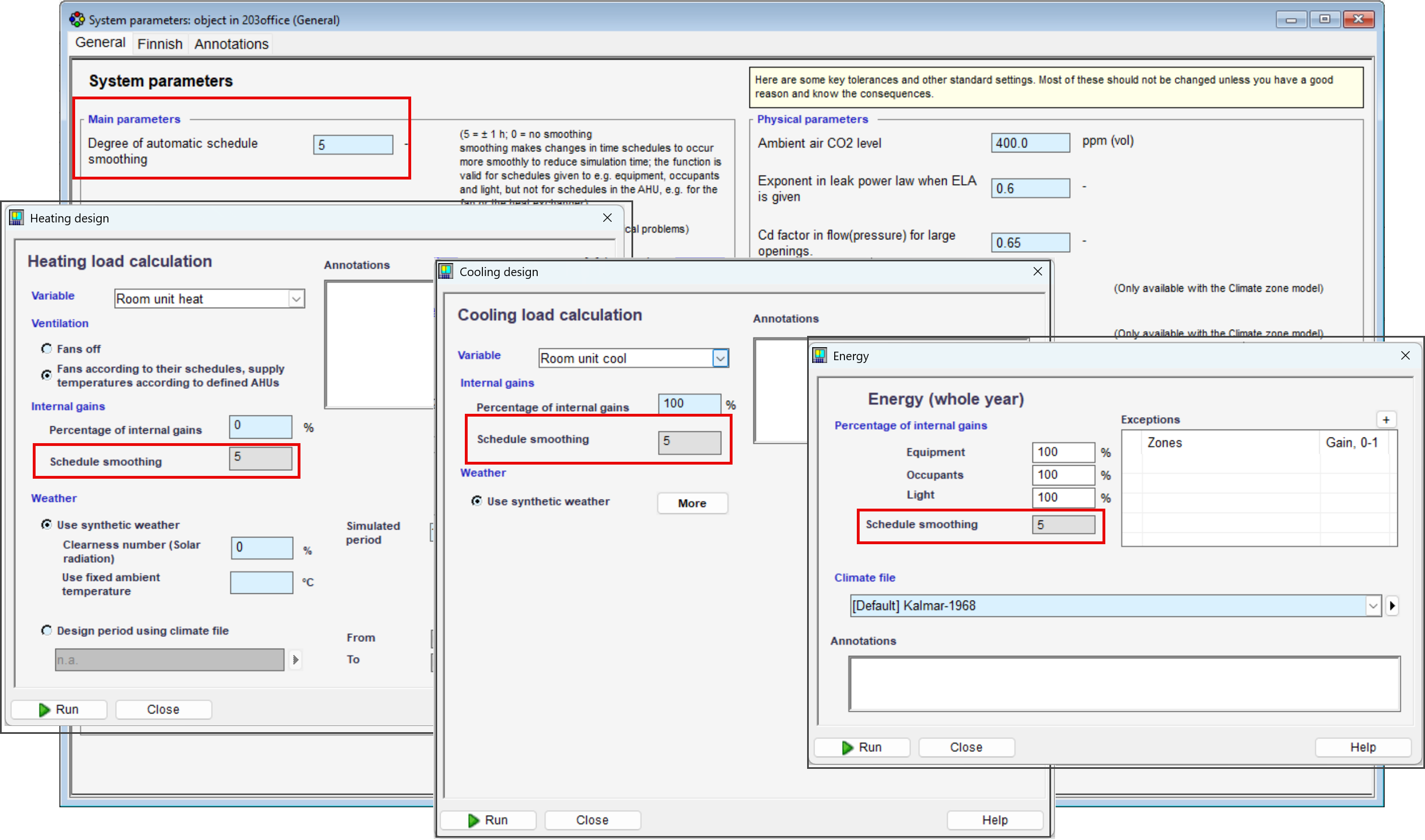
Smoothing by Simulation Type
Purpose: Control schedule smoothing separately for different simulation types, allowing the same model configuration to be used for different simulation purposes.
Ease of use: Apply smoothing where it improves result interpretation, while keeping it disabled for analyses where unsmoothed inputs are preferred.
Example: Use smoothing for annual energy simulations while keeping continuously varying occupancy schedules unchanged for heating load calculations.
Improved ISO 13370 Ground Model
Purpose: Improve ground heat transfer calculations according to ISO 13370 by distinguishing between zones at the building perimeter and zones within the building footprint.
Ease of use: Ground temperatures are automatically calculated according to zone position, providing a more accurate representation of ground heat losses without additional model setup.
Example: Simulate a large building where perimeter rooms experience different ground heat transfer conditions than rooms located in the center.
HVAC Systems & Controls
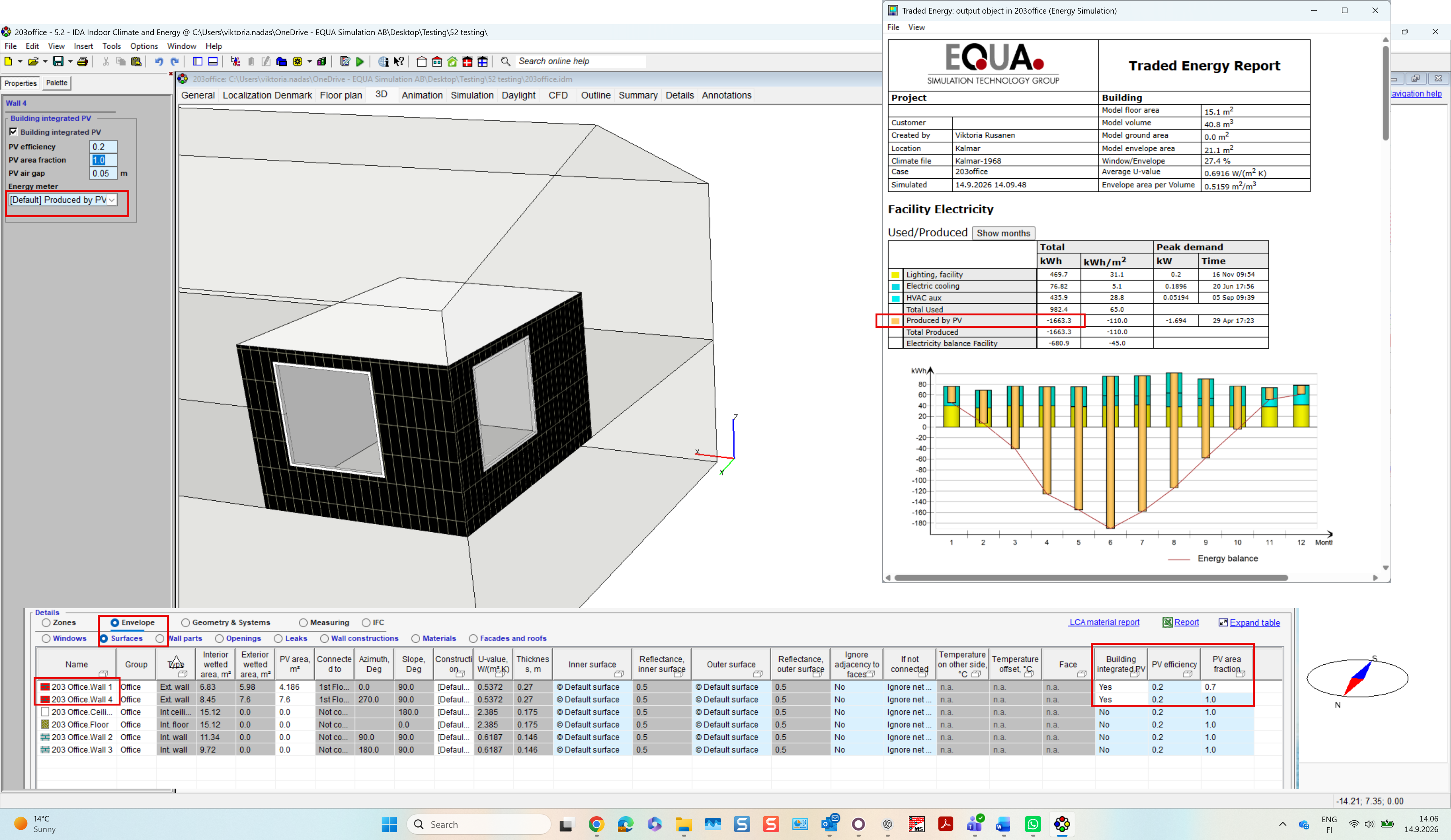
Building Integrated Photovoltaics (BIPV) beta
Purpose: Model façade-integrated PV systems and their interaction with the building envelope, including electricity generation and thermal processes.
Ease of use: Assign BIPV directly to façade at the surfaces table using only PV efficiency and area coverage. Electrical generation and thermal behaviour are calculated automatically and integrated into the building energy balance outputs.
Example: Evaluate the energy performance of an office building with BIPV façades, including electricity production and its impact on façade temperatures and different heat transfer processes, such as radiative exchange with the sky and ground, and convective heat transfer in the ventilated air gap behind the panel.
New Control Components
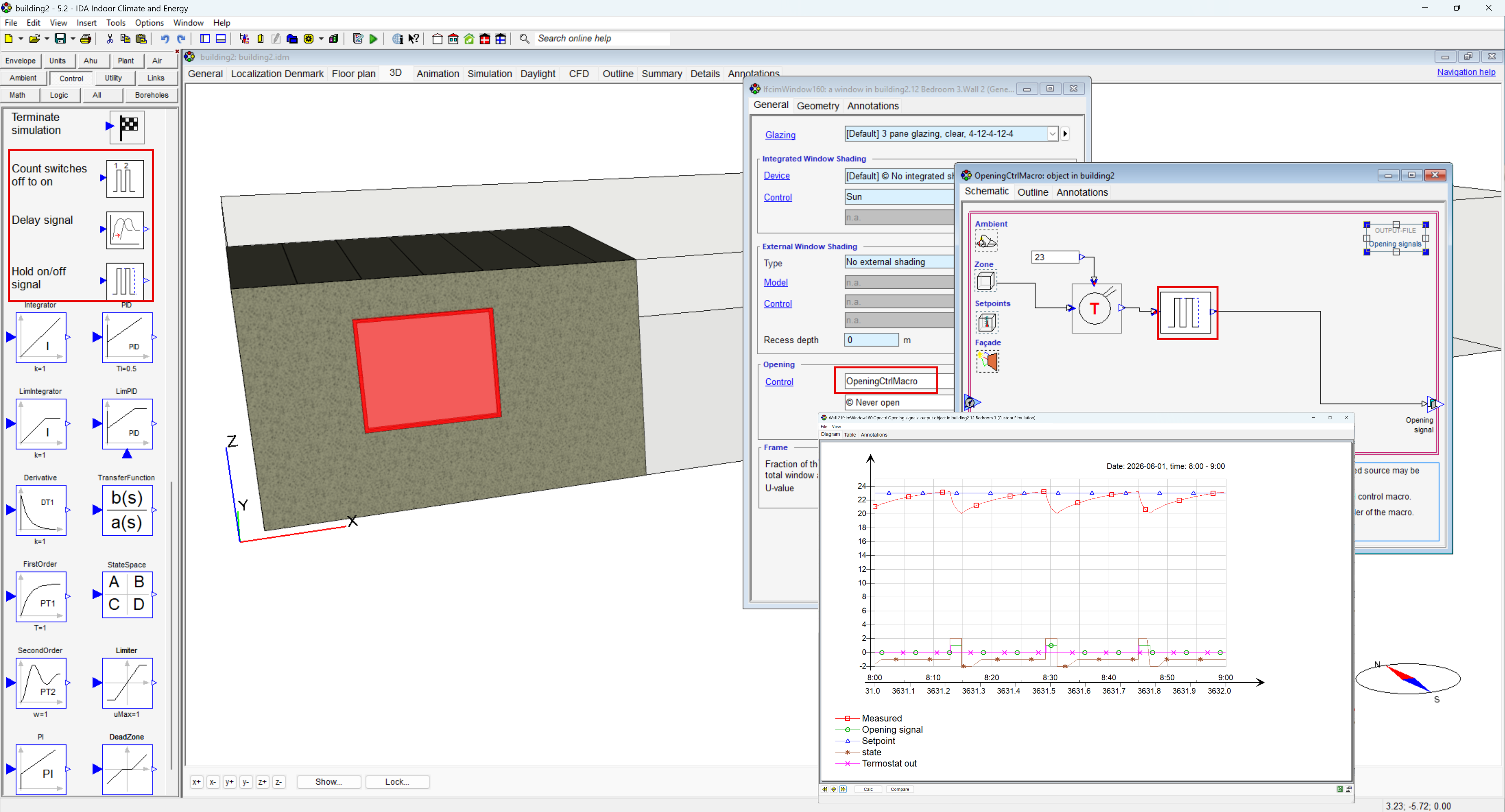
Purpose: Extend custom control strategies with three new components: Count switch counting (off → on), Delay and Hold signal.
Ease of use: Makes common control logic easier to build directly in IDA ICE, reducing the need for more complex combinations of existing controller components.
Example: Keep a window open for a minimum period after opening, even if the triggering control signal changes.
WISE Water Cooling and Heating System Control
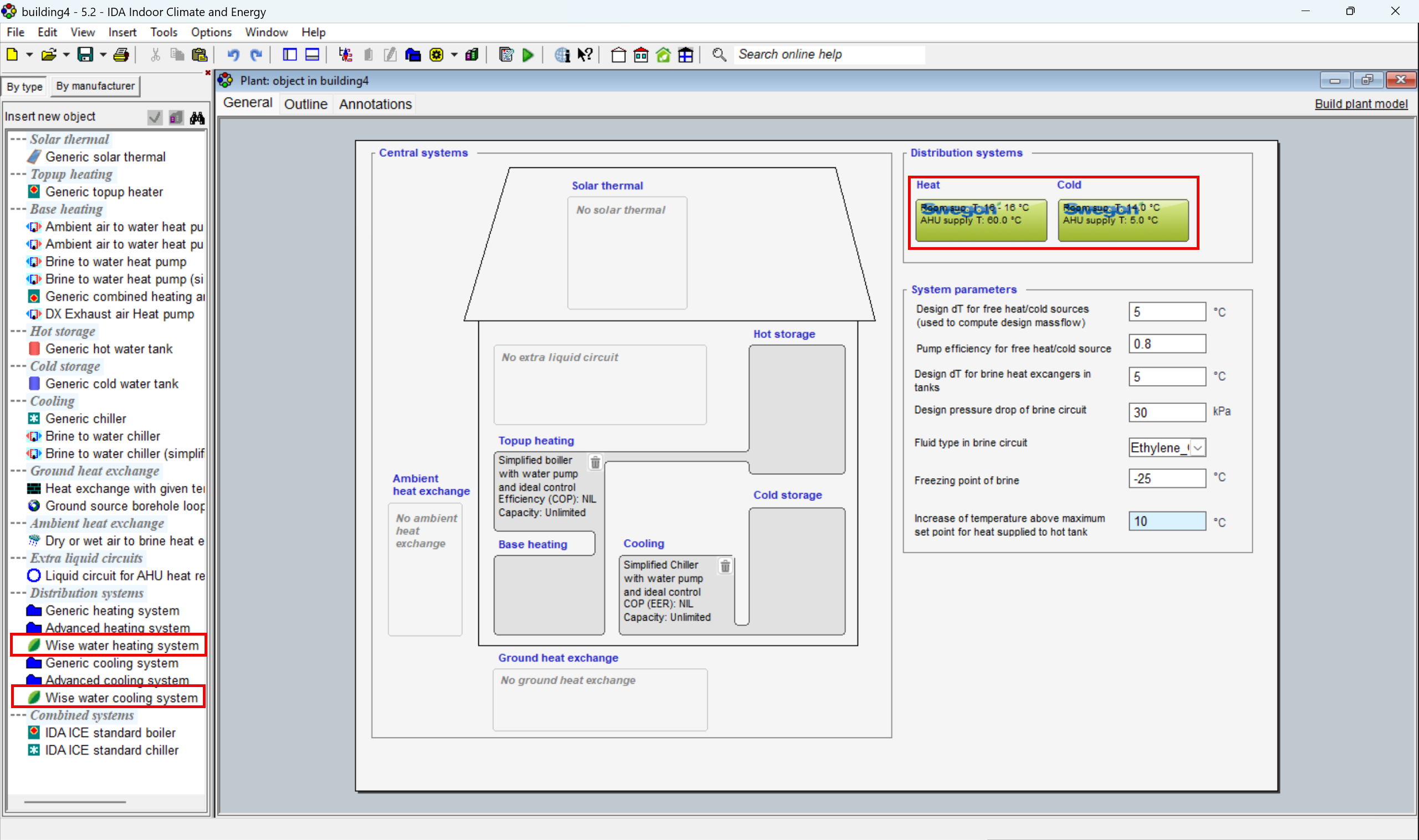
Purpose: Coordinate heating and cooling supply temperatures based on demand from multiple zones. The new WISE distribution system by Swegon dynamically adjusts AHU supply temperature according to zone control signals, valve positions and defined system limits.
Ease of use: Dedicated zone and AHU controllers make coordinated system control available at the Standard level. Advanced control strategies can be implemented without building custom control logic, while maintaining stable operation within configurable temperature limits.
Example: Adjust AHU supply temperature dynamically according to heating and cooling demand across multiple rooms, avoiding unnecessary temperature offsets while responding to changing zone conditions.
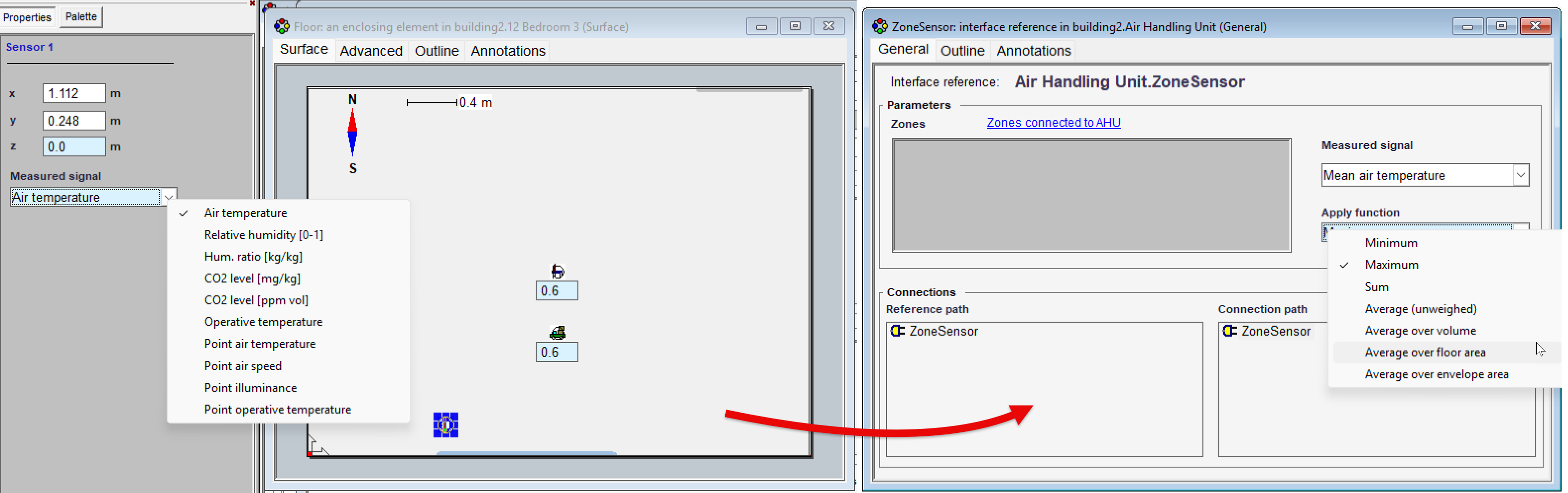
Extended Zone Sensor
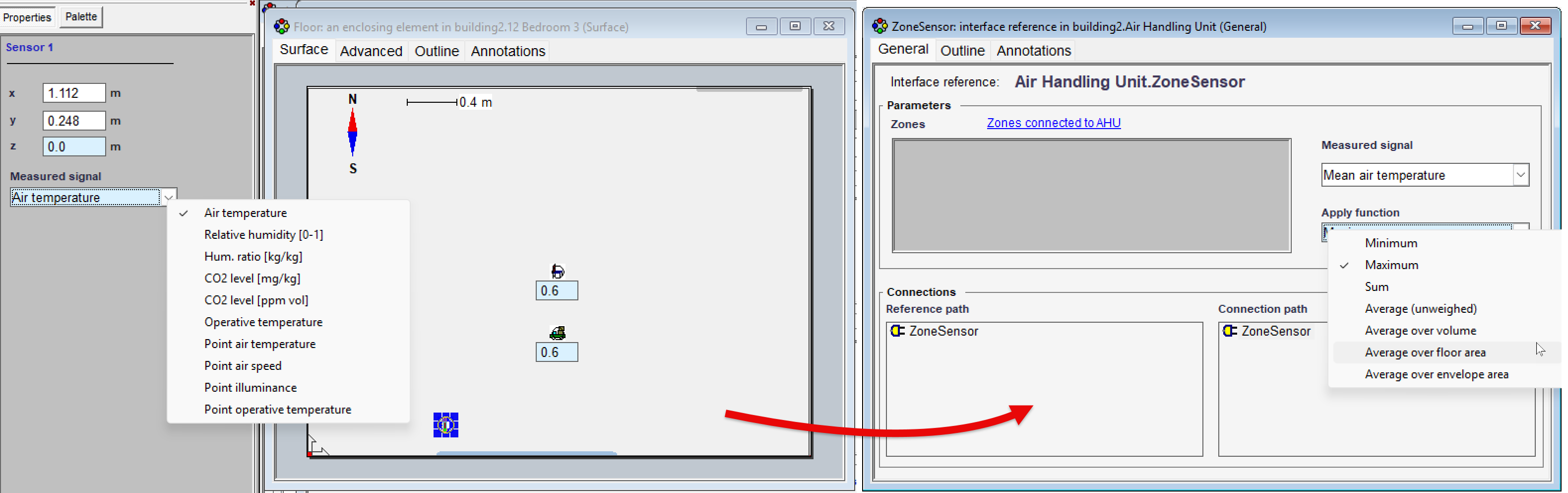
Purpose: Extend the Zone Sensor with access to additional control and operational signals, including setpoints, in-use status, time before use and VAV damper position. Sensor values can also be combined using Min, Max, Sum and several averaging methods.
Ease of use: More complex control strategies can now be built directly at the Standard level, with flexible aggregation of signals across multiple zones and less need to retrieve variables through Advanced-level modelling.
Example: Use the average, minimum or maximum conditions across several zones as an input for coordinated system control.
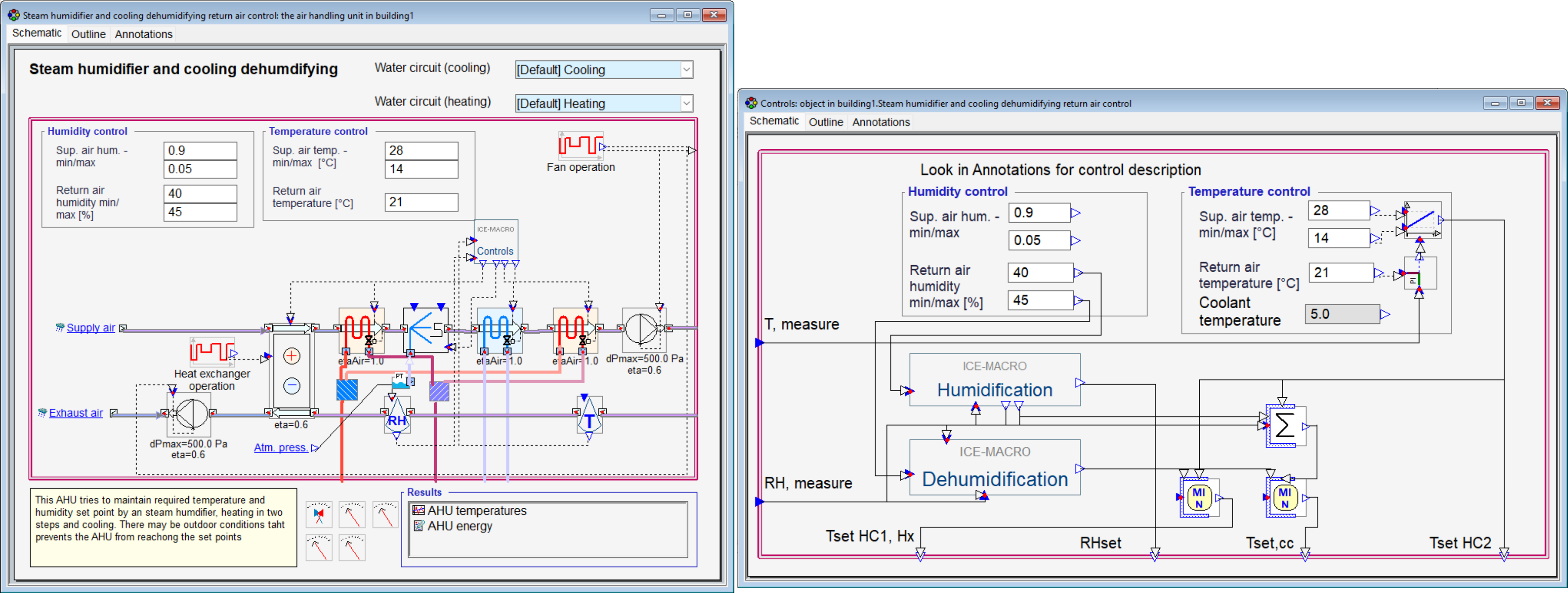
New, Extended Humidity Control AHU Models
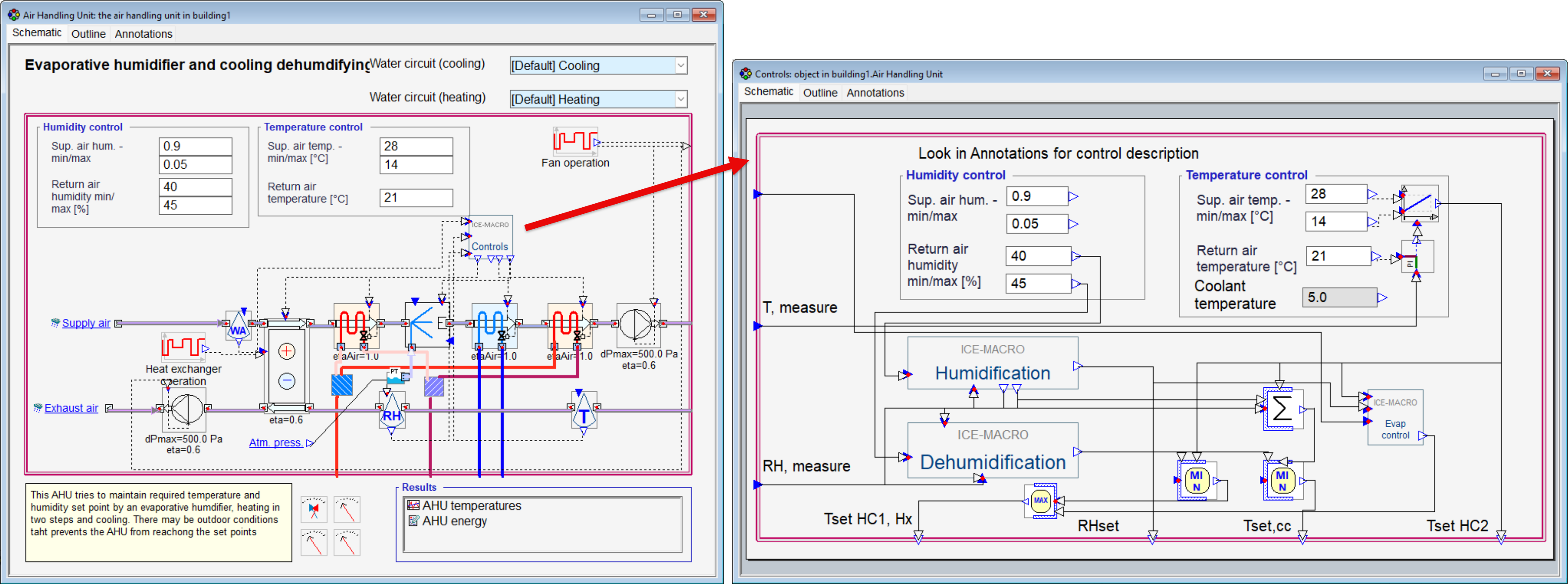
Purpose: Introduce extended humidity control for air handling units, with humidification, dehumidification and cooling logic explicitly represented in the controller instead of a black-box implementation.
Ease of use: Makes humidity control strategies easier to understand, troubleshoot and debug by providing direct access to the internal control logic. Added Annotations provide additional control descriptions.
Example: Configure AHUs with evaporative humidification and cooling-based dehumidification, or steam humidification and cooling-based dehumidification.
Evaporative AHU and controls:
Steam humidifier AHU and controls:
Predefined Air Terminal Types
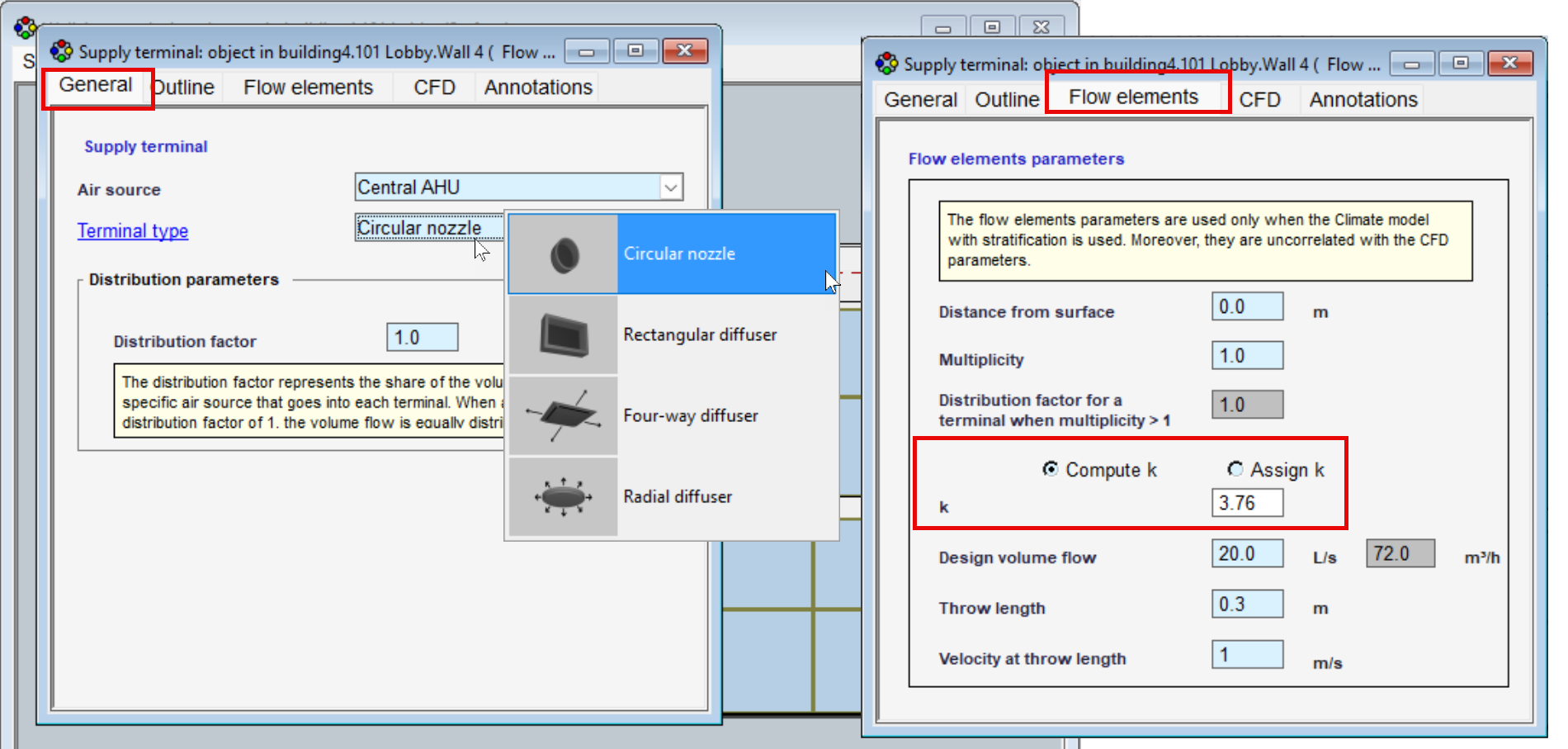
Purpose: Simplify the definition of air terminal throw characteristics for simulations with the stratified zone model by automatically assigning the throw coefficient (k-value) based on the selected terminal type.
Ease of use: Removes the need to manually define or estimate k-values, making it faster and easier to set up realistic air distribution characteristics without looking up manufacturer data.
Example: Select from predefined circular terminals; rectangular diffusers; four-way diffusers and radial diffusers – with the appropriate k-value assigned automatically.
Model Inspection & Results
Extended Sensor Logging
Purpose: Log sensor measurements directly for result diagrams. Depending on the zone model, the logged values can represent either zone/layer averages or point measurements at the sensor position.
Ease of use: Eliminates the previous workaround of routing sensor signals through a zone controller, making sensor-based results directly accessible for analysis and visualization.
Example: Log and visualize sensor measurements for air temperature, relative humidity, absolute humidity, CO₂ concentration, illuminance and operative temperature. Point measurements take flow elements into account and therefore are rather theoretical and not recommended to use in energy zone models.
Extended Output Object Logging
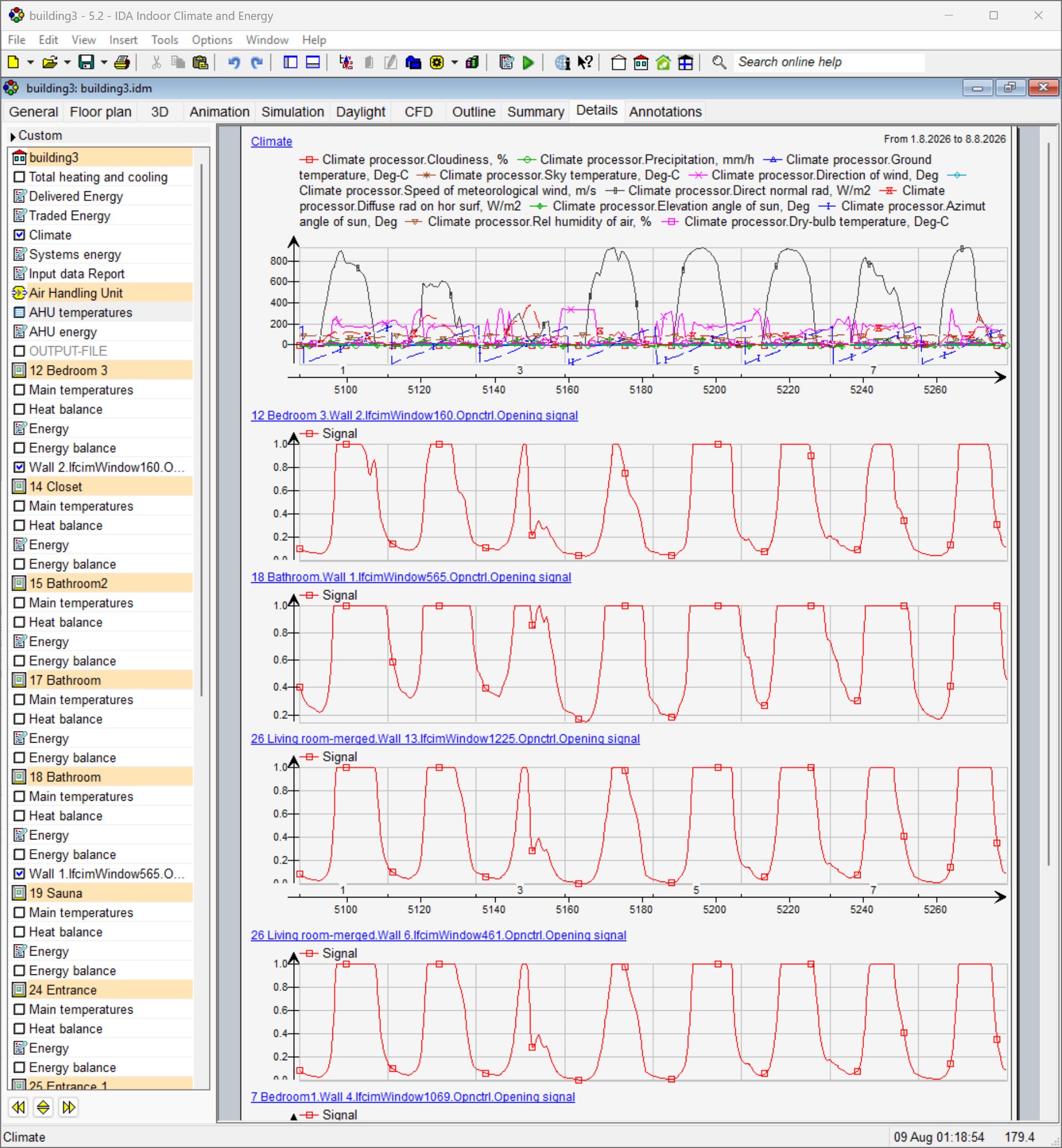
Purpose: Extend the range of variables that can be logged directly through output objects for simulation analysis and post-processing.
Ease of use: Makes additional simulation data directly accessible without custom logging, post-processing workarounds or Advanced-level modelling.
Example: Log from the Requested output list complete climate file data for external analysis; track window opening control signals individually for each window throughout the simulation.
Workflow and Productivity
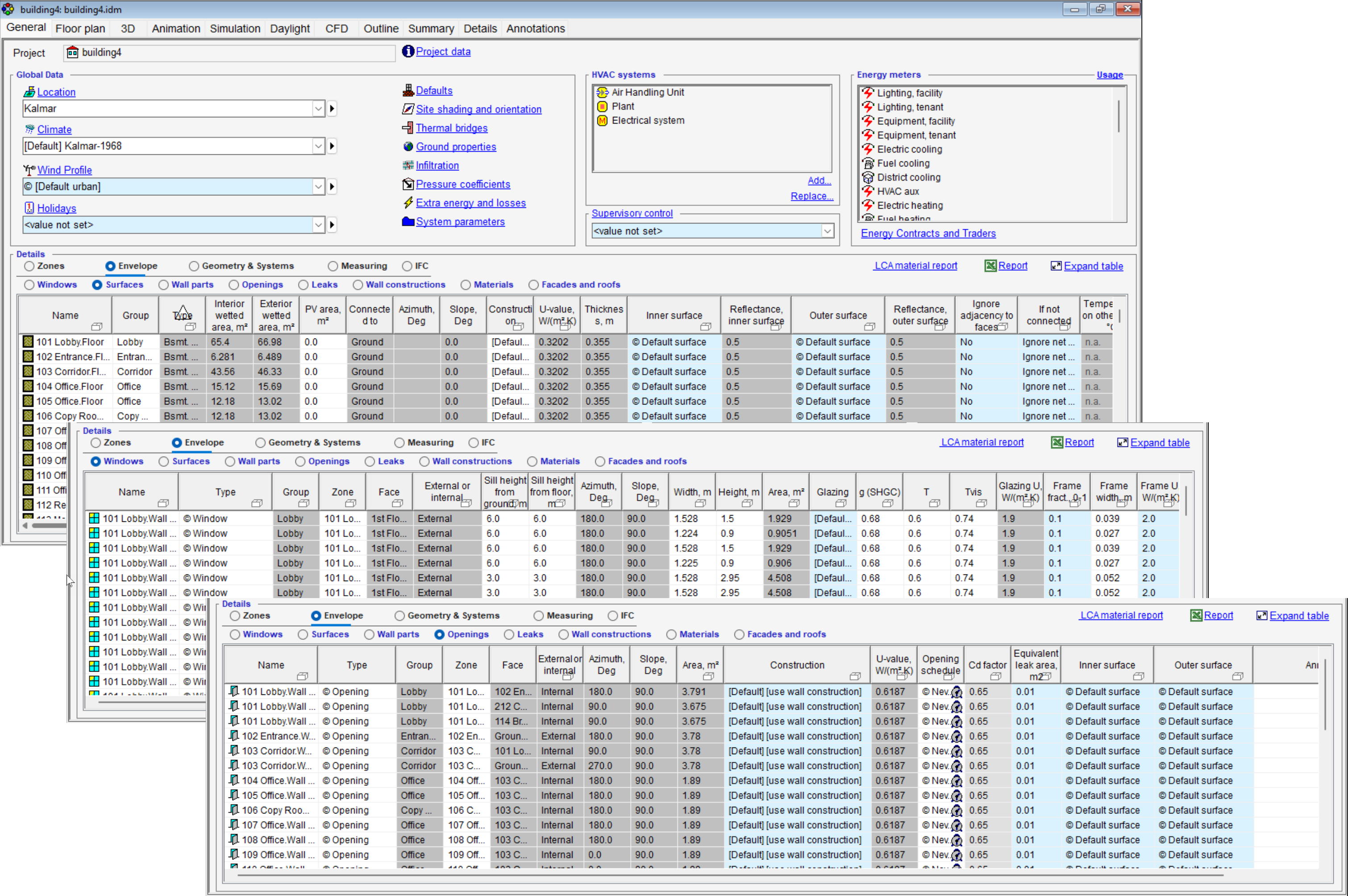
More Details in Model Tables
Purpose: Extend model tables with additional building and system information, providing a more complete overview of key model parameters directly in the tabular view.
Ease of use: Makes model inspection and verification faster by reducing the need for additional calculations or opening individual model objects to check their properties.
Example: Review window and door U-values; distinguish external and internal windows; check zone totals and surface properties; or view VAV airflow rates directly in absolute units.
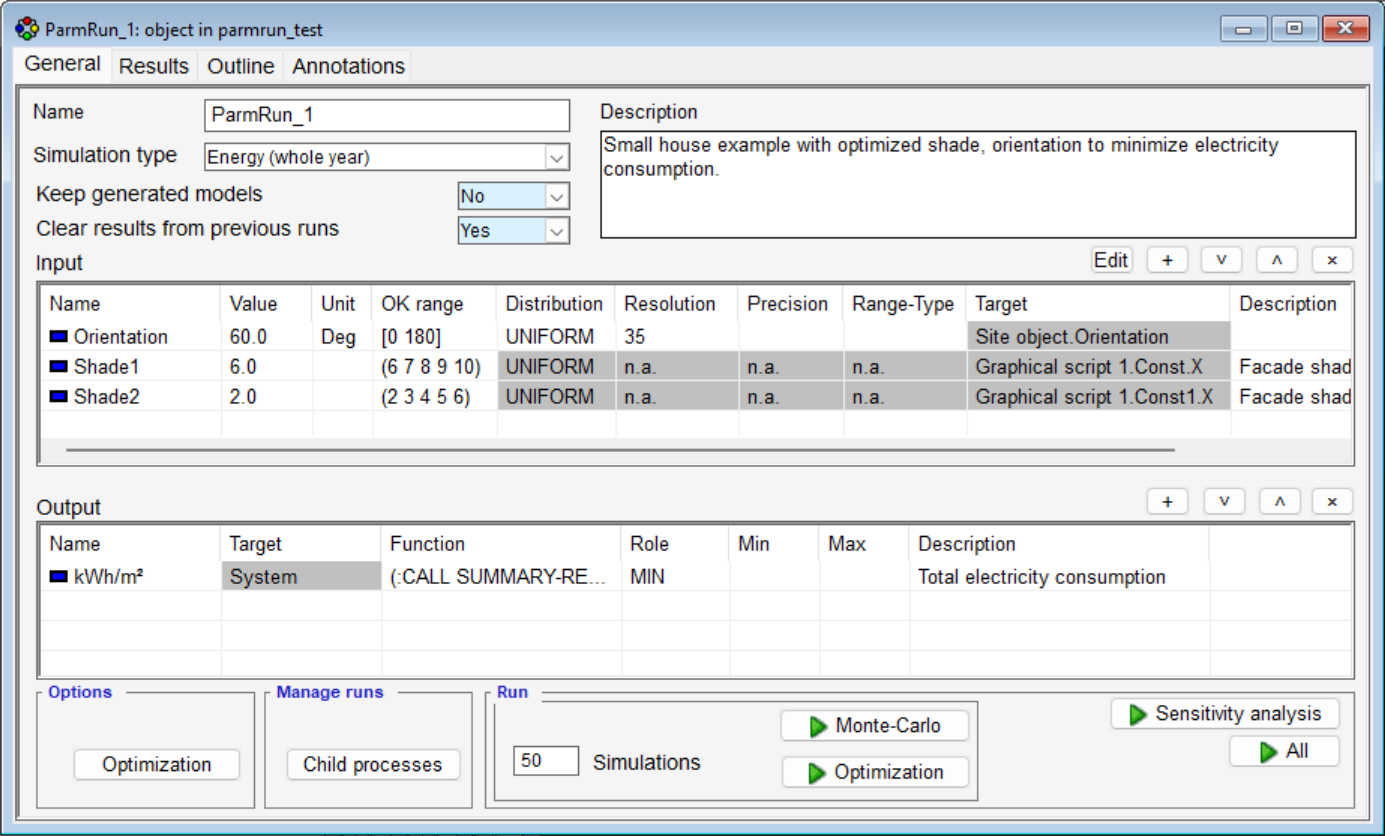
Improved Parametric Runs Interface
Purpose: Provide a clearer and more supportive interface for setting up and managing parametric simulation studies. Parameter variations and simulation runs are now more directly accessible, making the available functionality easier to understand and apply.
Ease of use: Simplifies the workflow for defining parameter variations and managing multiple simulation runs. Existing parametric capabilities can be used more intuitively, reducing the need for prior training or detailed knowledge of the previous setup process.
Faster Model Editing
Purpose: Improve model editing performance, particularly for large projects containing many zones or building bodies, with optimized model update routines delivering up to 70% faster editing operations.
Ease of use: Reduces waiting time when modifying zones, building bodies and other model objects, providing a smoother and more responsive editing workflow.
Platform & Extensions
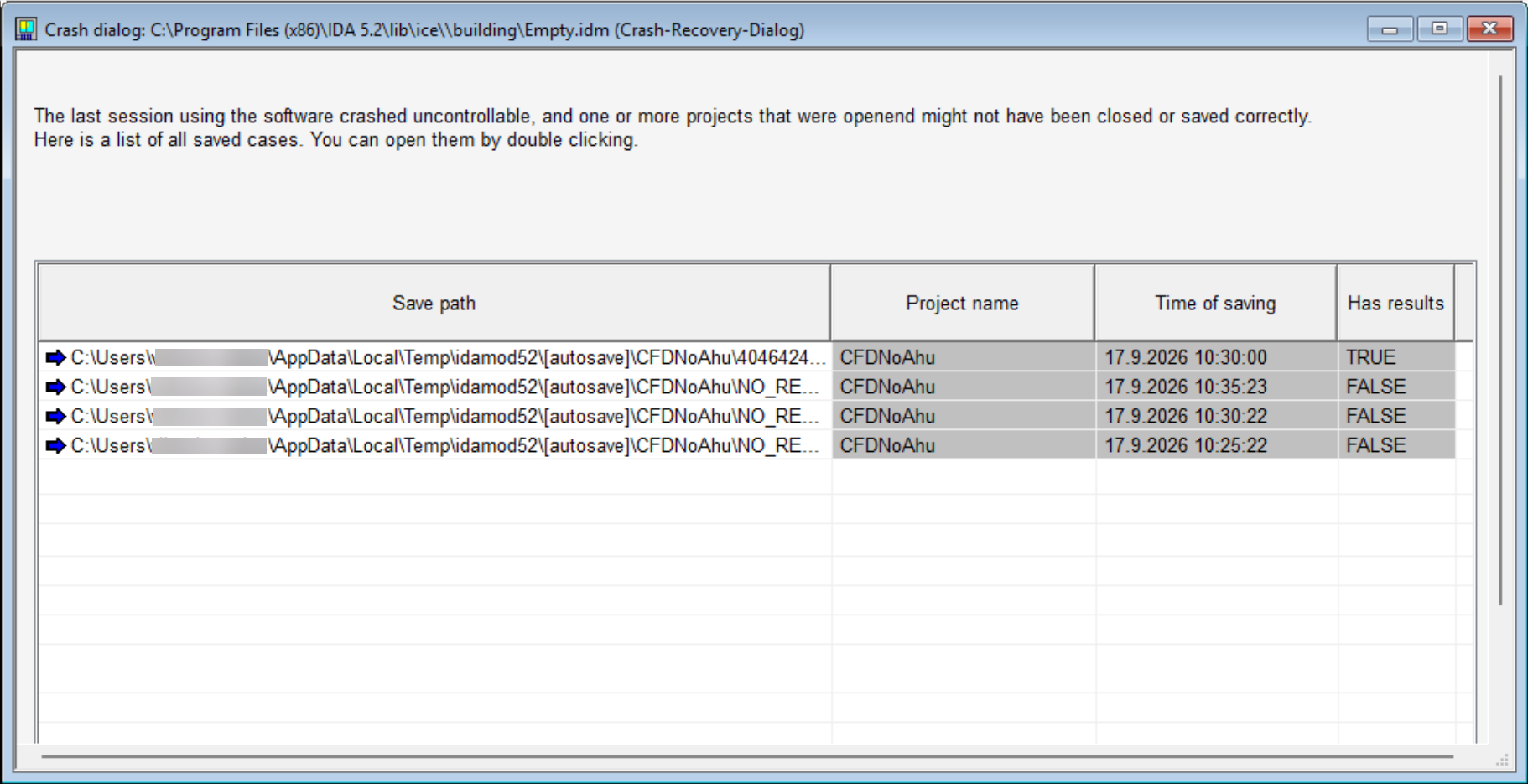
Improved Data Recovery and Autosave
Purpose: Reduce the risk of data loss and corrupted project files through improved crash recovery, safer file saving and a redesigned autosave mechanism, particularly for large simulation models.
Ease of use: Recoverable model versions are presented after a crash, while project files are validated before replacing an existing version. The redesigned Autosave focuses on essential model data, reducing saving time and file size.
Example: Recover the latest available model after an unexpected crash without losing a previously valid project file.
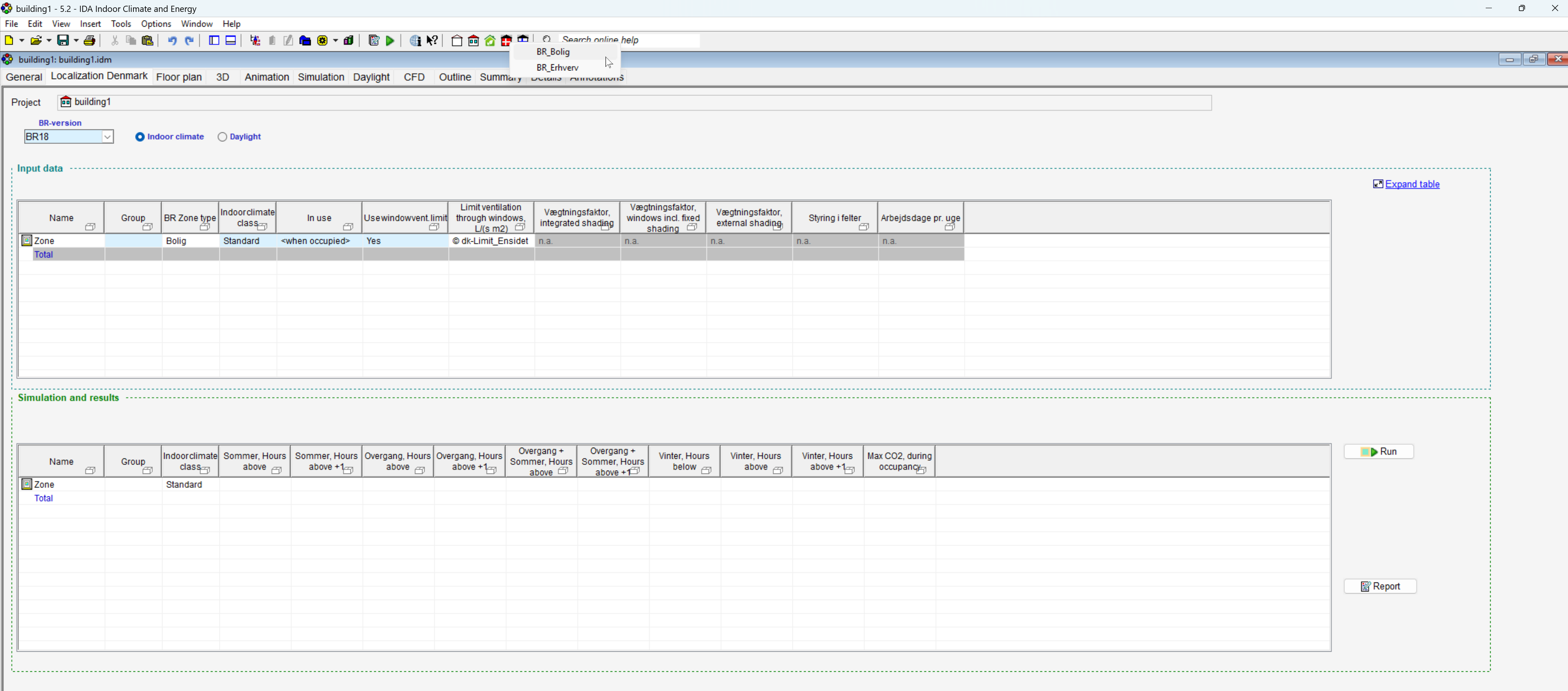
Localization Denmark BR18
Purpose: Support simulation workflow and compliance required by Branchvejledning for Indeklima, including thermal comfort assessment, natural ventilation, climate-based daylight calculations. The localization provides configurations specifically adapted to Danish regulatory requirements.
Ease of use: Preconfigured Danish weather files and project templates simplify project setup and provide a ready starting point for analyses, reducing the manual work needed to prepare compliant simulation models.
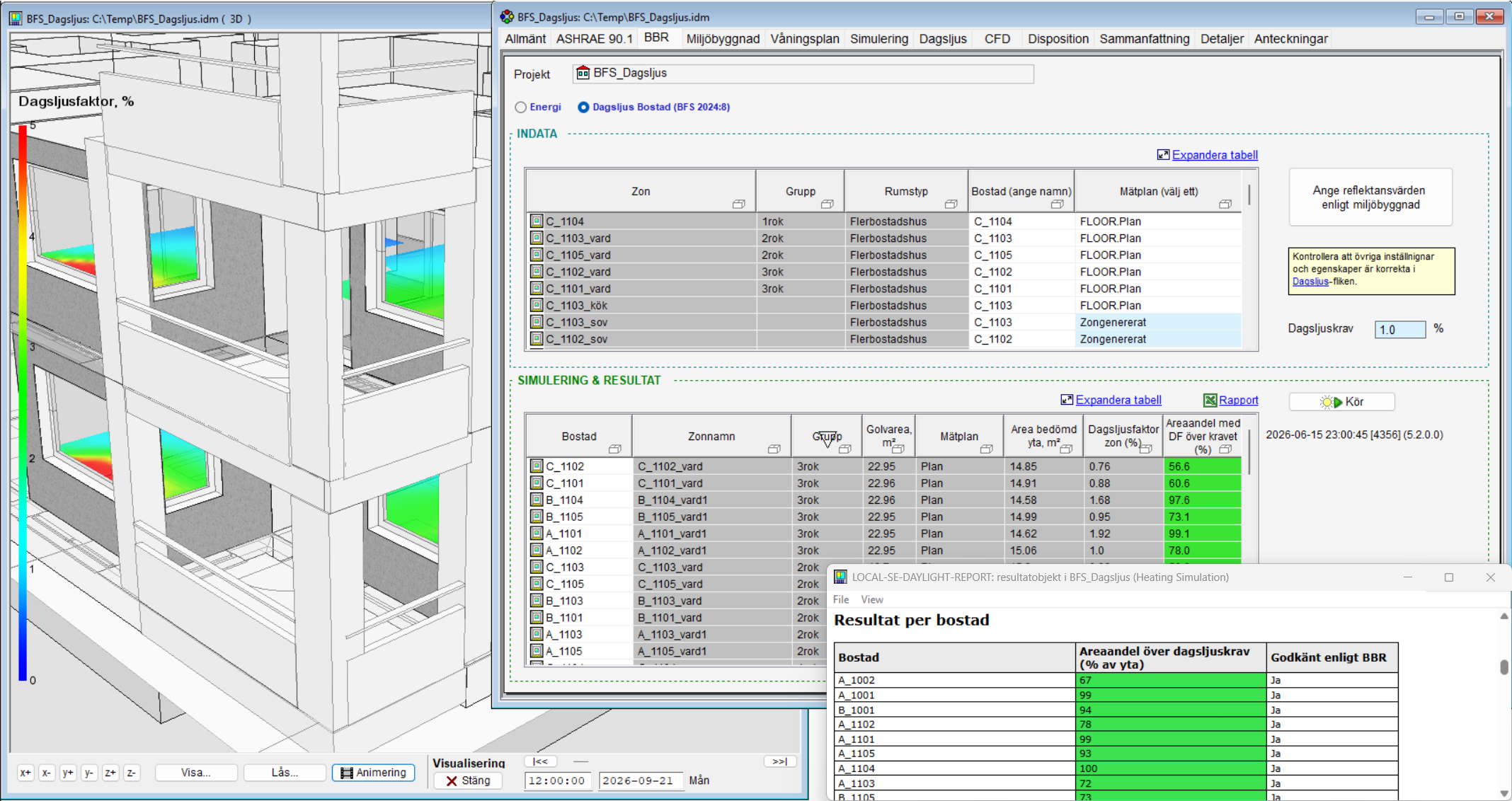
Updated Swedish localization according to BBR 31
Purpose: Support the latest Swedish regulatory requirements with an updated daylight factor calculation according to BFS 2024:8. Daylight performance is now evaluated at the apartment level rather than separately for each zone.
Ease of use: Aligns the daylight assessment workflow with current Swedish regulations and simplifies compliance evaluation for residential buildings by handling the apartment as the relevant assessment unit.
License Management System
Purpose: Replace the previous HASP-based licensing with a more flexible system for managing licenses across different machines and sharing network licenses between multiple users.
Ease of use: Simplifies license handling, particularly for larger organizations, and improves the maintenance support workflow. Support tickets can now be created directly from IDA ICE, making it easier to contact support and provide the necessary information.